Fedora 43 Upgrade: Two Machines, One Tiny Hiccup
Back in July I upgraded from Fedora 41 to 42 with mixed results. With the release of Fedora 43 in October 2025 I took the learned lessons, and threw myself towards the next major Fedora upgrade on two computers that ended with different results.
Passing It On
Upgrading Fedora for the first time was daunting. Despite the extensive documentation, I didn’t know what to actually expect. I didn’t know what output was good, what was bad, what signalled recoverable issues, etc.
Below you’ll find a lot of text blocks, just showing command output. I’m trying to help the “first time upgrader” understand what is expected, and what isn’t expected in the hope it gives you confidence when you come to upgrade your system. This is written as upgrading from Fedora 42. If you’re upgrading from an earlier version, read the documentation, first as some commands may be different.
Fedora 43 Changes
My goal of upgrading to Fedora 43 wasn’t driven by any one change in the latest release. In fact, the latest Fedora 43 release isn’t what you’d call ground-breaking. The introduction of RPM 6.0, bringing with it package signature enhancements, does scratch my package management itch.
Primarily though, I was driven by my desire to stay up-to-date boosted by the previous Fedora 42 upgrade experience.
But I did have one thought before I started — instead of upgrading, why not just switch to the latest release of Fedora Kinoite, the atomic desktop. I proceeded with the upgrade, so you can guess how well that went.
Upgrade Experience
Fedora provide extensive upgrade documentation, but essentially there are two upgrade paths:
As a command line animal, I started there on my desktop, as that’s easiest to recover if it all went wrong. I then moved onto my laptop.
Upgrading Fedora consists of three basic steps:
- Backup.
- Upgrade the current release with the latest packages. And reboot.
- Upgrade to the latest release. And Reboot.
Fedora upgrades are not heralded with any fanfare, or welcome screens. So I always take a before and after ‘snapshot’ of the /etc/os-release file using cat /etc/os-release:
$ cat /etc/os-release

NAME="Fedora Linux"
VERSION="42 (KDE Plasma Desktop Edition)"
RELEASE_TYPE=stable
ID=fedora
VERSION_ID=42
VERSION_CODENAME=""
PLATFORM_ID="platform:f42"
PRETTY_NAME="Fedora Linux 42 (KDE Plasma Desktop Edition)"
ANSI_COLOR="0;38;2;60;110;180"
LOGO=fedora-logo-icon
CPE_NAME="cpe:/o:fedoraproject:fedora:42"
DEFAULT_HOSTNAME="fedora"
HOME_URL="https://fedoraproject.org/"
DOCUMENTATION_URL="https://docs.fedoraproject.org/en-US/fedora/f42/"
SUPPORT_URL="https://ask.fedoraproject.org/"
BUG_REPORT_URL="https://bugzilla.redhat.com/"
REDHAT_BUGZILLA_PRODUCT="Fedora"
REDHAT_BUGZILLA_PRODUCT_VERSION=42
REDHAT_SUPPORT_PRODUCT="Fedora"
REDHAT_SUPPORT_PRODUCT_VERSION=42
SUPPORT_END=2026-05-13
VARIANT="KDE Plasma Desktop Edition"
VARIANT_ID=kde
Step 1. Backup
Before you do any potentially system destructive operation like upgrade to a new release, you should backup. This could be as simple as a file level backup using cp or rsync or more complicated using Borg or Kopia.
Step 2. Upgrade Current Packages. And Reboot
This first step is crucial. You must ensure that you have upgraded your current system packages. To do this run sudo dnf upgrade --refresh:
$ sudo dnf upgrade --refresh

Updating and loading repositories:
 virtio-win builds roughly matching what was shipped in latest RHEL                                  100% | 813.0   B/s |   1.5 KiB |  00m02s
 Scooter Software                                                                                    100% |   1.6 KiB/s |   3.0 KiB |  00m02s
 RPM Fusion for Fedora 42 - Nonfree                                                                  100% |   2.8 KiB/s |   9.0 KiB |  00m03s
 RPM Fusion for Fedora 42 - Nonfree - Updates                                                        100% |   2.8 KiB/s |   8.8 KiB |  00m03s
 RPM Fusion for Fedora 42 - Nonfree - Steam                                                          100% |   2.8 KiB/s |   8.3 KiB |  00m03s
 RPM Fusion for Fedora 42 - Nonfree - NVIDIA Driver                                                  100% |   3.0 KiB/s |   8.6 KiB |  00m03s
 RPM Fusion for Fedora 42 - Free - Updates                                                           100% |   3.3 KiB/s |   8.8 KiB |  00m03s
 RPM Fusion for Fedora 42 - Free                                                                     100% |   3.5 KiB/s |   8.9 KiB |  00m03s
 Kopia                                                                                               100% |   1.6 KiB/s |   3.0 KiB |  00m02s
 keybase                                                                                             100% |   2.0 KiB/s |   3.5 KiB |  00m02s
 Fedora 42 openh264 (From Cisco) - x86_64                                                            100% | 408.0   B/s | 986.0   B |  00m02s
 Fedora 42 - x86_64 - Updates                                                                        100% |   2.6 KiB/s |   6.0 KiB |  00m02s
 Fedora 42 - x86_64                                                                                  100% |  11.4 KiB/s |  22.8 KiB |  00m02s
 1Password Stable Channel                                                                            100% |   1.9 KiB/s |   3.0 KiB |  00m02s
 Docker CE Stable - x86_64                                                                           100% |   1.3 KiB/s |   2.0 KiB |  00m02s
 Copr repo for PyCharm owned by phracek                                                              100% |   1.4 KiB/s |   2.1 KiB |  00m02s
 cloudflared-stable                                                                                  100% |   2.0 KiB/s |   3.0 KiB |  00m01s
 google-chrome                                                                                       100% | 939.0   B/s |   1.3 KiB |  00m01s
Repositories loaded.
Nothing to do.
As I perform a daily upgrade, there are no packages out-of-date.
By default, dnf caches the repository indexes for a period of time. The --refresh switch tells dnf to ‘refresh’ those indexes now and check for out-of-date packages.
If any packages are upgraded, just reboot. People will tell you that you don’t have to, or it depends, or, or, or …. It takes two minutes, and could save your system, so don’t overthink it. Just sudo reboot.
Step 3. Latest Release Upgrade. And Reboot
The last step — upgrade to the latest release. In this case, Fedora 43. To do this, run sudo dnf system-upgrade download --releasever=43:
$ sudo dnf system-upgrade download --releasever=43
Updating and loading repositories:
virtio-win builds roughly matching wha 100% | 2.6 KiB/s | 1.5 KiB | 00m01s
Scooter Software 100% | 5.1 KiB/s | 3.0 KiB | 00m01s
RPM Fusion for Fedora 43 - Nonfree 100% | 3.3 KiB/s | 9.0 KiB | 00m03s
RPM Fusion for Fedora 43 - Nonfree - U 100% | 3.8 KiB/s | 8.8 KiB | 00m02s
RPM Fusion for Fedora 43 - Nonfree - S 100% | 3.8 KiB/s | 8.3 KiB | 00m02s
RPM Fusion for Fedora 43 - Nonfree - N 100% | 4.2 KiB/s | 8.6 KiB | 00m02s
RPM Fusion for Fedora 43 - Free - Upda 100% | 4.6 KiB/s | 8.8 KiB | 00m02s
RPM Fusion for Fedora 43 - Free 100% | 5.8 KiB/s | 8.9 KiB | 00m02s
Kopia 100% | 5.1 KiB/s | 3.0 KiB | 00m01s
keybase 100% | 11.1 KiB/s | 3.5 KiB | 00m00s
Fedora 43 - x86_64 100% | 16.4 KiB/s | 22.4 KiB | 00m01s
1Password Stable Channel 100% | 12.0 KiB/s | 3.0 KiB | 00m00s
google-chrome 100% | 6.4 KiB/s | 1.3 KiB | 00m00s
Fedora 43 - x86_64 - Updates 100% | 5.4 KiB/s | 6.6 KiB | 00m01s
Copr repo for PyCharm owned by phracek 100% | 11.9 KiB/s | 2.1 KiB | 00m00s
cloudflared-stable 100% | 25.0 KiB/s | 3.0 KiB | 00m00s
Docker CE Stable - x86_64 100% | 16.7 KiB/s | 2.0 KiB | 00m00s
Fedora 43 openh264 (From Cisco) - x86_ 100% | 1.1 KiB/s | 986.0 B | 00m01s
...
[ CUT FOR BREVITY ]
...
Installing:
fedora-release-kde-desktop noarch 43-25 fedora 0.0 B
replacing fedora-release-kde noarch 42-30 updates 0.0 B
kernel x86_64 6.17.12-300.fc43 updates 0.0 B
kernel-core x86_64 6.17.12-300.fc43 updates 96.9 MiB
kernel-devel x86_64 6.17.12-300.fc43 updates 83.6 MiB
kernel-modules x86_64 6.17.12-300.fc43 updates 95.6 MiB
kernel-modules-core x86_64 6.17.12-300.fc43 updates 68.3 MiB
kernel-modules-extra x86_64 6.17.12-300.fc43 updates 4.2 MiB
pandoc-cli x86_64 3.6.4-38.fc43 updates 203.5 MiB
replacing pandoc x86_64 3.1.11.1-34.1.fc42 updates 191.1 MiB
Installing group/module packages:
gnupg2-g13 x86_64 2.4.8-4.fc43 fedora 9.7 KiB
replacing gnupg2 x86_64 2.4.7-2.fc42 fedora 9.8 MiB
gnupg2-scdaemon x86_64 2.4.8-4.fc43 fedora 689.6 KiB
replacing gnupg2 x86_64 2.4.7-2.fc42 fedora 9.8 MiB
gnupg2-utils x86_64 2.4.8-4.fc43 fedora 342.7 KiB
replacing gnupg2 x86_64 2.4.7-2.fc42 fedora 9.8 MiB
gnupg2-wks x86_64 2.4.8-4.fc43 fedora 269.4 KiB
replacing gnupg2 x86_64 2.4.7-2.fc42 fedora 9.8 MiB
kleopatra x86_64 25.12.0-1.fc43 updates 6.4 MiB
libva-intel-driver x86_64 2.4.1^20241027gitd30e013-2.fc43 rpmfusion-free 7.9 MiB
pipewire-config-raop x86_64 1.4.9-1.fc43 updates 35.0 B
thermald x86_64 2.5.9-2.fc43 fedora 596.7 KiB
Installing:
v4l-utils x86_64 1.32.0-1.fc43 updates 1.7 MiB
replacing edid-decode x86_64 0-76.20241118git4bdd7790.fc42 fedora 411.6 KiB
Installing dependencies:
7zip x86_64 25.01-1.fc43 updates 3.3 MiB
replacing p7zip-plugins x86_64 16.02-32.fc42 fedora 2.7 MiB
anaconda-webui noarch 53.1^20251022g00cddf56-1.fc43 fedora 5.7 MiB
clang-libs x86_64 21.1.7-1.fc43 updates 114.9 MiB
clang-resource-filesystem x86_64 21.1.7-1.fc43 updates 15.3 KiB
cockpit-bridge noarch 353.1-1.fc43 updates 2.1 MiB
cockpit-storaged noarch 353.1-1.fc43 updates 821.6 KiB
cockpit-system noarch 353.1-1.fc43 updates 3.0 MiB
cockpit-ws x86_64 353.1-1.fc43 updates 1.8 MiB
cockpit-ws-selinux x86_64 353.1-1.fc43 updates 44.9 KiB
dns-root-data noarch 2025080400-2.fc43 updates 12.0 KiB
f43-backgrounds-base noarch 43.0.3-1.fc43 fedora 7.4 MiB
f43-backgrounds-kde noarch 43.0.3-1.fc43 fedora 3.6 KiB
fedora-release-identity-kde-desktop noarch 43-25 fedora 2.0 KiB
replacing fedora-release-identity-kde noarch 42-30 updates 2.0 KiB
gap-srpm-macros noarch 2-1.fc43 fedora 2.1 KiB
glycin-devel x86_64 2.0.5-1.fc43 updates 126.1 KiB
glycin-libs i686 2.0.5-1.fc43 updates 4.9 MiB
glycin-libs x86_64 2.0.5-1.fc43 updates 4.4 MiB
glycin-loaders i686 2.0.5-1.fc43 updates 15.1 MiB
glycin-loaders x86_64 2.0.5-1.fc43 updates 13.0 MiB
gnupg2-dirmngr x86_64 2.4.8-4.fc43 fedora 618.4 KiB
gnupg2-gpg-agent x86_64 2.4.8-4.fc43 fedora 671.4 KiB
gnupg2-gpgconf x86_64 2.4.8-4.fc43 fedora 250.0 KiB
gnupg2-keyboxd x86_64 2.4.8-4.fc43 fedora 201.4 KiB
gnupg2-verify x86_64 2.4.8-4.fc43 fedora 348.5 KiB
gpgverify noarch 2.2-3.fc43 fedora 8.7 KiB
highway i686 1.3.0-1.fc43 updates 2.2 MiB
igvm-libs x86_64 0.4.0-6.fc43 updates 495.4 KiB
java-srpm-macros noarch 1-7.fc43 fedora 870.0 B
lcms2-devel x86_64 2.16-6.fc43 fedora 135.7 KiB
libaom i686 3.13.1-1.fc43 fedora 3.6 MiB
libcap-devel x86_64 2.76-3.fc43 fedora 37.5 KiB
libdav1d i686 1.5.2-1.fc43 updates 1.1 MiB
libheif i686 1.20.2-6.fc43 fedora 1.6 MiB
libjxl i686 1:0.11.1-7.fc43 updates 2.7 MiB
replacing jxl-pixbuf-loader x86_64 1:0.11.1-4.fc42 updates 29.2 KiB
liblastlog2 x86_64 2.41.3-7.fc43 updates 33.9 KiB
libreswan-minimal x86_64 5.3-3.fc43 fedora 4.9 MiB
librsvg2 i686 2.61.0-3.fc43 updates 5.3 MiB
replacing rsvg-pixbuf-loader x86_64 2.60.0-2.fc42 updates 339.4 KiB
libseccomp i686 2.6.0-2.fc43 fedora 228.2 KiB
libseccomp-devel x86_64 2.6.0-2.fc43 fedora 114.3 KiB
libstemmer i686 3.0.1-8.fc43 fedora 576.6 KiB
lzo i686 2.10-15.fc43 fedora 178.2 KiB
lzo-devel x86_64 2.10-15.fc43 fedora 212.2 KiB
lzo-minilzo x86_64 2.10-15.fc43 fedora 36.7 KiB
mimetreeparser x86_64 25.12.0-1.fc43 updates 1.2 MiB
nftables-services noarch 1:1.1.3-5.fc43 fedora 32.1 KiB
ngtcp2 x86_64 1.18.0-1.fc43 updates 314.3 KiB
ngtcp2-crypto-gnutls x86_64 1.18.0-1.fc43 updates 39.6 KiB
ngtcp2-crypto-ossl x86_64 1.18.0-1.fc43 updates 51.7 KiB
openjpeg i686 2.5.4-1.fc43 fedora 479.7 KiB
qemu-device-uefi-vars x86_64 2:10.1.3-1.fc43 updates 61.9 KiB
rav1e-libs i686 0.7.1-8.fc43 fedora 2.0 MiB
simdutf x86_64 7.2.1-2.fc43 fedora 607.3 KiB
svt-av1-libs i686 3.1.2-1.fc43 fedora 2.7 MiB
Installing weak dependencies:
compiler-rt x86_64 21.1.7-1.fc43 updates 41.1 MiB
dnf4-plugin-notify-PackageKit noarch 1.3.3-4.fc43 updates 2.9 KiB
libdnf5-plugin-notify-PackageKit x86_64 1.3.3-4.fc43 updates 15.9 KiB
libomp x86_64 21.1.7-1.fc43 updates 2.8 MiB
libomp-devel x86_64 21.1.7-1.fc43 updates 1.5 MiB
slitherer x86_64 0~git20251108.d230dba-1.fc43 updates 55.5 KiB
sscg x86_64 4.0.3-2.fc43 updates 117.2 KiB
udisks2-btrfs x86_64 2.11.0-1.fc43 updates 575.0 KiB
udisks2-lvm2 x86_64 2.11.0-1.fc43 updates 636.0 KiB
wcurl noarch 2025.05.26-2.fc43 fedora 22.4 KiB
Upgrading groups:
Virtualization
LibreOffice
KDE Spin Initial Setup
KDE PIM
KDE Multimedia support
KDE Applications
Firefox Web Browser
Development Tools
Anaconda tools
Upgrading groups:
Standard
Printing Support
Common NetworkManager Submodules
Multimedia
KDE
Input Methods
Hardware Support
Guest Desktop Agents
Fonts
Dial-up Networking Support
Desktop accessibility
Core
base-graphical
Upgrading environmental groups:
KDE Plasma Workspaces
Transaction Summary:
Installing: 80 packages
Upgrading: 2955 packages
Replacing: 2977 packages
Removing: 8 packages
Downgrading: 9 packages
Total size of inbound packages is 4 GiB. Need to download 4 GiB.
After this operation, 343 MiB extra will be used (install 11 GiB, remove 11 GiB).
Is this ok [y/N]:
If you are happy to continue the system upgrade, press y and let it run.
Note that we are downloading 4GB of packages. Depending on the speed of your internet connection, and computer, this could take anywhere from a few minutes to hours to download and upgrade, but the progress is shown on-screen.
Part way through, you will likely see this message:
Importing OpenPGP key 0x31645531:
 UserID     : "Fedora (43) <[email protected]>"
 Fingerprint: C6E7F081CF80E13146676E88829B606631645531
 From       : file:///etc/pki/rpm-gpg/RPM-GPG-KEY-fedora-43-x86_64
Is this ok [y/N]:
This key is needed as part of the upgrade and you need to accept it to continue.
The key was successfully imported.
Once the upgrade is complete, you’ll get the final message. It’s Go / No Go time.
Transaction stored to be performed offline. Run `dnf5 offline reboot` to reboot and run the transaction. To cancel the transaction and delete the downloaded files, use `dnf5 offline clean`.
Complete!
If you’re ready to commit, run sudo dnf5 offline reboot.
Wait
Now that you have rebooted, you need to wait. You will see some screens (apologies for the blurry nature of the photos below):

Fedora 43 - Starting upgrade.

Fedora 43 - 94% of the upgrade is complete.
Fireworks and Fanfare
When you log back in to Fedora 43, you’ll see nothing. No fanfare. No fireworks. Not even a notification. Linux is like that. Humble.
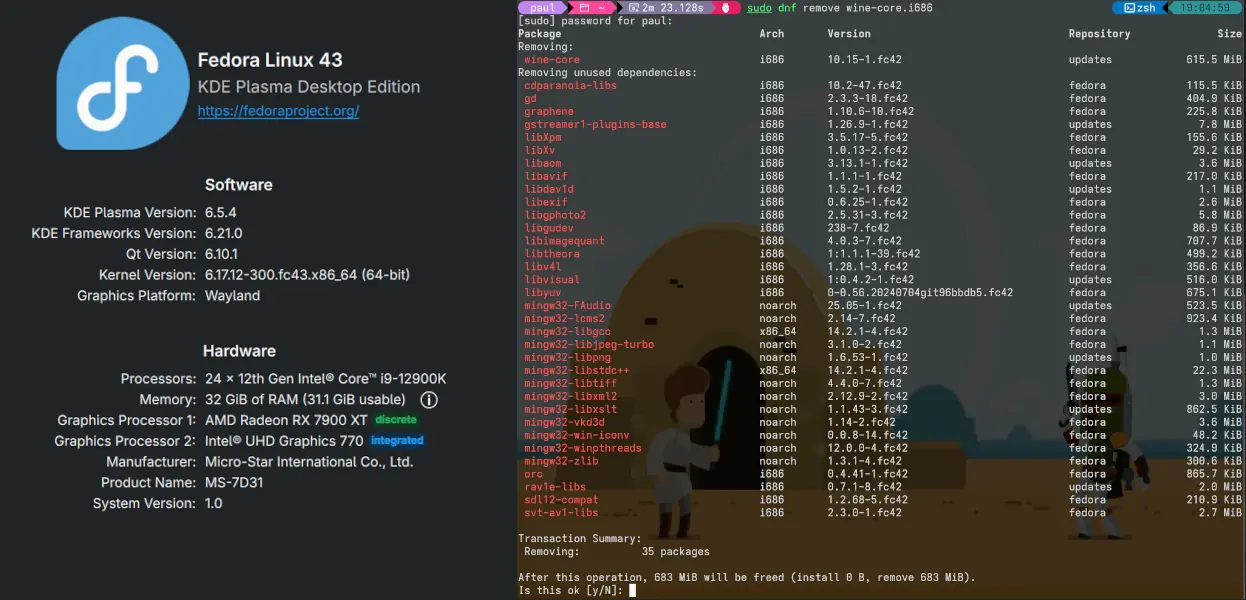
Go to System Settings → About this System, and you’ll see what you’re looking for:

Fedora 43 - System Settings.
Or you can do another cat /etc/os-release:
NAME="Fedora Linux"
VERSION="43 (KDE Plasma Desktop Edition)"
RELEASE_TYPE=stable
ID=fedora
VERSION_ID=43
VERSION_CODENAME=""
PRETTY_NAME="Fedora Linux 43 (KDE Plasma Desktop Edition)"
ANSI_COLOR="0;38;2;60;110;180"
LOGO=fedora-logo-icon
CPE_NAME="cpe:/o:fedoraproject:fedora:43"
DEFAULT_HOSTNAME="fedora"
HOME_URL="https://fedoraproject.org/"
DOCUMENTATION_URL="https://docs.fedoraproject.org/en-US/fedora/f43/"
SUPPORT_URL="https://ask.fedoraproject.org/"
BUG_REPORT_URL="https://bugzilla.redhat.com/"
REDHAT_BUGZILLA_PRODUCT="Fedora"
REDHAT_BUGZILLA_PRODUCT_VERSION=43
REDHAT_SUPPORT_PRODUCT="Fedora"
REDHAT_SUPPORT_PRODUCT_VERSION=43
SUPPORT_END=2026-12-02
VARIANT="KDE Plasma Desktop Edition"
VARIANT_ID=kde
Now you’re done. Congratulations! But stick around and find out what hiccup I encountered as I understand it’s fairly common.
The Desktop Hiccup
After running sudo dnf system-upgrade download --releasever=43 on my desktop, I got a good way through the process before I saw this error:
Transaction failed: Rpm transaction failed.
  - file /usr/lib/wine/i386-windows/urlmon.dll conflicts between attempted installs of wine-core-10.20-2.fc43.i686 and wine-core-10.20-2.fc43.x86_64
  - file /usr/lib/wine/i386-windows/windows.devices.bluetooth.dll conflicts between attempted installs of wine-core-10.20-2.fc43.i686 and wine-core-10.20-2.fc43.x86_64
  - file /usr/lib/wine/i386-windows/wined3d.dll conflicts between attempted installs of wine-core-10.20-2.fc43.i686 and wine-core-10.20-2.fc43.x86_64                                                                                                             /2m23.1s
The package upgrade failed.
On my desktop I use Lutris, which I know uses Wine. Wine isn’t something that runs all the time, so I just uninstalled it with sudo dnf remove wine-core.i686. Once the upgrade was complete, and I was back in Fedora 43, I installed it again using sudo dnf install wine-core.i686.
This was an easy hiccup, and if you are to get any issues upgrading this is the sort of issue you want to get. Quick. Simple. Straightforward.
The Laptop Experience
The laptop upgrade went smoothly without any hiccups. Unlike the desktop, I don’t run Wine, so there were no package conflicts. The entire process from start to finish took about 20 minutes. While I waited on package upgrades and the final operating system upgrade, I browsed Mastodon on my phone, confident that everything was going smoothly.
Final Thoughts
Any operating system upgrade is a major operation that comes with risks. I have taken a few precautions to help minimise any downtime that might occur by:
- Separating my
/homefolder onto a different drive. - Regularly backing up my
/homefolder.
This is the second upgrade I’ve gone through in Fedora. Without wanting to jinx the next upgrade, it is a fairly painless process. One suggestion to the Fedora Team would be to add some fanfare and fireworks to the upgrade process!
Have you had any problems when upgrading to Fedora 43? Let’s chat in the comments below.
